
Equipment procurement resource
Pool equipment BOM template for supplier review
Missing duty or connection data can leave suppliers pricing different equipment. Use this pool equipment BOM template to keep your requirement, the supplier’s offer and the approval status on the same line.
Editable files, no login. Open in Excel or another spreadsheet editor; attach the completed file manually in WhatsApp.

Start with the file or keep your consultant’s schedule
The blank CSV includes the column headings and an empty row. The separate example shows how to record open technical fields without turning a supplier assumption into an approved requirement. Both files are plain tables with no formulas or automatic equipment sizing.
- Add the project reference, revision and destination to each row so the context stays with exported lines.
- Give each item a stable tag. Split duty units, standby units and separately ordered spares into distinct lines.
- Enter TBC for unresolved data, name the person who will confirm it, and retain the question when you circulate the file.
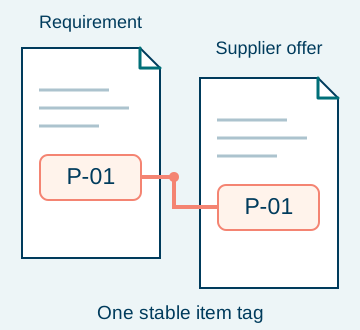
Fields that make an equipment line reviewable
Fill the requirement columns from the approved project documents. Let the supplier complete the offered-model and evidence columns, then record technical approval separately. This division makes differences visible before you compare prices.
| Field group in the CSV | What to enter | Dominant failure mode & prevention |
|---|---|---|
| Project and revision | Project reference, BOM revision, destination and required-on-site date; identify the date as requested until confirmed. | Old scope gets quoted. Issue the same dated revision to each supplier. |
| Item and quantity | Item tag, category, service, quantity and unit. State duty, standby or spare in the service field. | Standby equipment gets omitted or counted as operating duty. Separate the roles before totalling. |
| Duty or specification | Engineer-approved performance and units; for a pump, flow and head together. Reference the supporting drawing or schedule. | A power label replaces the duty requirement. Ask for the offered model’s matching performance curve. |
| Electrical basis | Project voltage, phase and frequency, plus a reference to the approved electrical schedule. | An unsuitable motor variant gets priced. Compare the selected model’s nameplate and manual with the project supply. |
| Connections and interfaces | Connection size, type/standard and material, mating item reference, plus any space or control-interface constraint. | Equipment arrives without compatible connections. Identify both mating ends and price required adapters explicitly. |
| Models and documents | Reference model, rule for alternatives, offered model and document reference; list required certificates or listings by project requirement. | An unapproved substitute enters the order. Review model-specific evidence against the stated requirement. |
| Approval and open questions | Approval status, approval reference, unresolved question and confirmation owner. Use TBC for missing data. | An unanswered question disappears in a revised quote. Carry it forward until the owner closes it. |
A filled example that keeps unknowns visible
These are illustrative procurement entries. TBC means “to be confirmed”; none of the sample rows selects a product or supplies an operating setting. The downloadable example uses the same columns as the blank file.
| Item / service | Requirement to carry forward | Supplier response needed | Approval status |
|---|---|---|---|
| P-01 / filtration pump, duty | Quantity TBC; flow/head, electrical supply and connection details TBC. Engineer to issue the design schedule. | Offered model, curve, electrical datasheet and connection drawing. | Open: engineer confirmation required. |
| F-01 / filter | Quantity and design flow TBC; media, connections and document scope TBC. | Offered model, datasheet, included media/valves and exclusions. | Open: compare with the approved filtration design. |
| A-01 / return inlet fitting | Quantity TBC; material, finish and mating connection TBC. | Exact item reference, drawing and scope of supplied fittings. | Open: drawing and quantity approval required. |
Check quantities without inventing a design
For repeated identical scopes, order quantity = number of pools × approved units per pool + separately approved spares. A counting example with assumed inputs: 3 pools × 4 return inlet fittings + 2 spare fittings = 14 fittings. These figures demonstrate arithmetic only; the project engineer sets the actual layout and quantities. Reconcile the total against the drawings before ordering.
Confirm both sides of a connection
Record the equipment connection and the mating pipe or fitting separately, including the connection standard and material. Ask which union, adapter, seal or valve the quotation includes. A matching nominal size alone leaves the connection type and supplied parts unresolved.
If a required duty, electrical basis or connection remains TBC, request a clarification or a conditional offer before technical approval. Keep proposed equipment open until the responsible engineer accepts the selection.
The OEM manual linked below lists electrical nameplate data to verify and includes a flow/head curve. Use the current manual for the actual offered model when completing these fields.
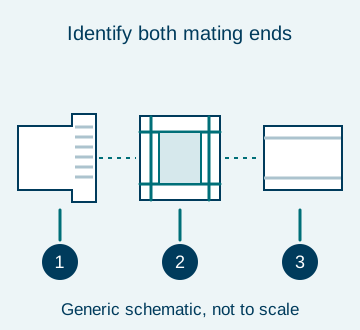
- 1Equipment end: type and size
- 2Coupling: included parts
- 3Pipe end: standard and material
Keep approval attached to the offered model
Retain the item tag when you revise a requirement. Record the BOM revision, the offered model, the document revision and the approval reference together. If a supplier proposes a different model after approval, reopen that line for review before updating the order.
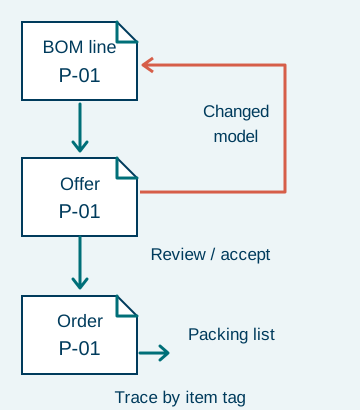

Compare the complete supply scope
Compare quotations against the same approved revision. Separate equipment from connection kits, controls, consumables and delivery charges so a lower equipment price does not hide a different package. Ask for warranty terms and replacement-part references for the selected configuration.
| Scope to compare | What to ask the supplier |
|---|---|
| Connections and controls | Which unions, adapters, valves, sensors and control interfaces are included, excluded or supplied by another trade? |
| Consumables and spares | Which media, seals or other selected-model consumables are included? Which spare items require separate approval? |
| Packing and transport | What packing, freight and destination boundary is priced? Identify customs clearance and site delivery responsibility. |
| Documents and acceptance | Which submittals, model-specific listings and pre-dispatch records are included? State who accepts each document. |
Send the current revision for supply review
Send your existing consultant schedule or the completed CSV with the project destination, drawing references and open questions. We coordinate the supply review; your engineer approves the technical selection. After WhatsApp opens, attach the file manually. This page does not upload or receive documents.
| What to send | Why it helps | Example format |
|---|---|---|
| BOM and revision | Keep every supplier on the same scope. | Project reference + revision + CSV, Excel or PDF |
| Drawings and electrical basis | Check the offered equipment against its interfaces. | Drawing references + electrical schedule |
| Open items and approval contact | Give each unresolved value a confirmation owner. | Item tag + question + responsible person |
| Destination and delivery boundary | Separate the requested site date from an agreed supply schedule. | City/port + requested date + delivery scope |
Method and sources
The CSV is a procurement working format, with fields organised for line-by-line supply review. The sample tags, revision sequence and counting example are illustrative. Source scope checked 18 October 2026:
- OEM pump installation and user guide
Electrical Installation, printed page 2, and Performance Curves, printed page 6. Supports the data to verify; this resource assigns no model ratings or installation limits.
- NSF pool and spa equipment: public scope
Public summary of NSF/ANSI/CAN 50 only. If the project requires a listing, request evidence tied to the offered model; citing the standard does not establish certification or local approval.